Flexible Work? This Lenovo Yoga 2-in-1 Notebook Moves + Bends With You
It flips a whole 360 degrees.

by Louise Lizan
Published on May 14, 2026
Products and services mentioned on our websites are independently selected by our editors. If you buy something through our links, Summit Media may earn an affiliate commission at no extra cost to you.
(SPOT.ph) These days, being flexible goes beyond Pilates and yoga classes. The sight of laptops has become ever-present in the world of remote work. That line between work and life blurs, and it has become common practice to meet a deadline or attend a Teams meeting in the middle of the airport or ocean. Flexibility is not just asked of you, but also of your gear. That said, it makes sense to get a laptop that not just moves with you—but also bends. The Lenovo Yoga 7i does just that.
Laptop or tablet? It's always one or the other. Sure, tablets can be more flexible and portable, with added attachments like a keyboard and a stylus. But laptops can handle more of the heavy-duty, high-performance tasks. But why choose between the two when the Lenovo Yoga 7i is both? We had the chance to test out this two-in-one laptop for a few weeks, and here are our thoughts.
Also read: There Are No Bad Seats at a Concert With the Samsung Galaxy S26 Ultra
What is the Lenovo Yoga 7i 2-in-1?
It's in the name. Lenovo Yoga 7i is a notebook that one can bend into a downward-facing dog and a whole lot more. You can flip it inside out to make it a bigger (14", baby), slightly thicker tablet. It's as easy as a switch for when you're going from work to play—and vice versa. This convertible notebook is powered by an Intel Core Ultra 7 processor and is packed with a 70-watt-hour battery, which gives you a solid, all-day performance.
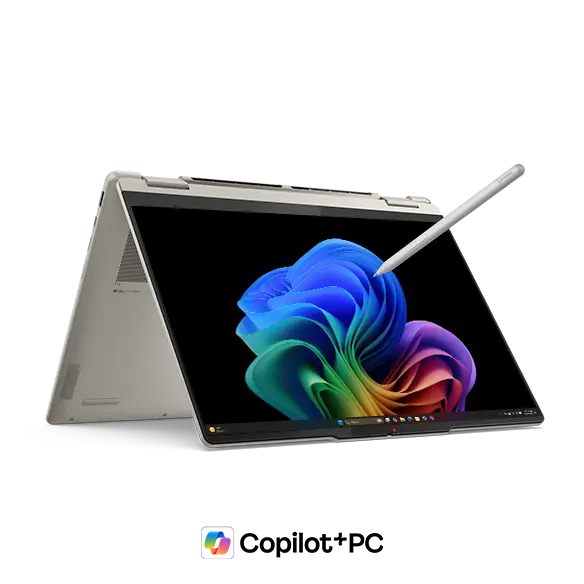
The Yoga 7i 2-in-1 takes flexibility seriously, not just in the way it does things but also how it looks. Its modern aesthetic is versatile enough to blend in whenever and wherever you go. It features rounded edges and a leather cover that gives more grip if you're carrying it. It also gives a premium look and feel compared to the basic black laptops in the market.
Say goodbye to blurry faces on Teams meeting because the Yoga 7i 2-in-1 boasts a modern 5.0 MP IR & RGB hybrid webcam. It also has a built-in physical camera shutter if you don't want surprise camera appearances and even privacy breaches.
Since it's a laptop-slash-tablet, the whole 14", 2.8K (2880 x 1800) OLED display is your playground. You can freely touch the screen with your finger or with the Lenovo Yoga Pen. The Yoga 7i 2-in-1 is compatible with the pen, which is sold separately, which creatives can use for sketching, notetaking, and even clicking if you're too lazy to use the trackpad.
Thoughts on the Lenovo Yoga 7i 2-in-1:
.jpg?fit=cover&width=960&q=82)
.jpg?fit=cover&width=960&q=82)
.jpg?fit=cover&width=960&q=82)
When I first heard the name Lenovo Yoga 7i 2-in-1, I was confused. What does a laptop have to do with the practice? I was not familiar with Lenovo's line of detachable, convertible laptops—only knew and used the good ol' reliable ThinkPad for years. Alas, no matter how scared I was to flip the Lenovo Yoga 7i all 360 degrees the first day I had it, all the questions I had in my head about the name died down in an instant. Because, boy, it can really bend. More than I can.
After getting over the fact that it's a notebook that I can flip into a tablet, a tent, and stand mode, it was time to focus on how it looks and feels. Part of me was scared that it would malfunction somehow when I flip it, but it always proved me wrong. There was no lag or creaks on the hinge. It automatically adjusts the orientation, too, just as smoothly as when your hands fly over the keyboards (you're also in for a little ASMR moment) or when you're going from tab to tab.
Unlike most laptops with a matte cover finish, which easily slips out of my grasp, the Lenovo Yoga 7i has a textured finish that provides a good grip. Aside from the added hold, it's light at 1.38 kilograms it was easy to bring around either by hand or in a bag. I didn't even sweat carrying this inside its box, which contains the charger and the Lenovo Yoga Pen.
.jpg?fit=cover&width=960&q=82)
.jpg?fit=cover&width=960&q=82)
All modes are optimal when it comes to watching movies and series on the big screen. But one thing I really loved is that even against the sunlight, the colors stay bright (courtesy of the 1,100 nits peak brightness) and vivid. I personally use the tent mode a lot, especially when I watched YouTube during lunchtime.
Maybe I was sick of the black colorway of my work laptop that the white colorway—called Seashell—of the Lenovo Yoga 7i became a sight for sore eyes. It's not just cool on the eyes, too, but it literally has an advanced thermal design, so it stays cool and quiet during the heavy loads. No hyperventilating moments from the laptop.
.jpg?fit=cover&width=960&q=82)
As a writer who also dabbles in other creative pursuits like editing multimedia posts (both personal and for work), the stylus came in handy. The tent and stand mode offers more convenience and more space when doodling, clicking, or moving with accuracy using the stylus. Note-taking was also made easier with the tablet mode. The only problem I had with the pen is that I didn't have anywhere to put it when not in use. It snapped to the cover, sure, but it has no slot for it to stay hidden whenever I wanted it to be.
Lack of dedicated pen space aside, it had the right amount of ports. Apart from the charging ports (one USB-A, two USB-C), there's a slot for the HDMI, a headphone-slash-microphone combo 3.5mm jack, and a microSD card reader. If you're wondering where to turn this laptop on and off (like I did the first time), the power button is hidden in plain sight on the side. There's no fingerprint scanner for unlocking and security purposes, but it wasn’t much of a dealbreaker for me.

Power wasn’t much of an issue for me and charging it at night gave me more than enough power for the next day. I didn’t overload it with the usual work tasks, but the Lenovo Yoga could function without me having to look for a charger and a port in panic. If you do end up with a low battery, though, 15 minutes can get you up to three hours of battery life thanks to its Rapid Charge Express feature.
We had a little bit of trouble with the camera at first, with an error message popping up whenever we opened the application. Even video calling through Telegram and Messenger wasn't possible at first. After panicking... updating and restarting, it operated smoothly, much to our relief and delight. As far as webcam camera quality is concerned, the Lenovo Yoga 7i is clear and crisp (but we also kind of live for that grainy aesthetic). We did a video call over Telegram, and my video auto-zooms.
The camera has an HD pro option, and you can customize the framing grid for better shots. It automatically adjusts the lighting. You can take good selfies via tablet mode, but we hope you don't skip arm days when you work out.

We weren't able to fully utilize it, but professionals who want to build a work ecosystem that allows them to access their mobile device through their laptop can do so with the Lenovo Yoga. Calls and messages can be seen through the start menu to make sure you won't miss a thing. You can also easily grab and drag photos, too, for those whose work can also be done on their phones.
That said, why choose between a laptop and a tablet when convertible notebooks like the Lenovo Yoga 7i 2-in-1 exist? No need to buy two separate gadgets. With its light weight, touch screen features as a tablet, full power as a laptop, and physical flexibility, it can easily adapt to different working styles. Whether you're a student or a professional, this notebook is flexible enough, both literally and figuratively, to adjust to your demands—be it juggling all your projects, traveling the world, or both, at the same damn time.
The Lenovo Yoga 7i bends to your will. And with it, you can say that you're not the only one who's flexible—your gear is, too.
Price, where to order the Lenovo Yoga 7i 2-in-1:
Lenovo Yoga 7i 2-in-1 (14", Gen 10) 83JQ00AGPH is priced at P79,995, and the brand's convertible laptops are available online through Lenovo's website. For more of Lenovo's offerings, check out their official Shopee page.
For more information and updates, check out Lenovo Philippines' Facebook and Instagram pages.
Also read:
This Foldable Desk Makes Remote Work Lighter + More Stable
This Thin and Lightweight Power Bank Can Charge Your Laptops and Gadgets
Links are updated regularly and as much as possible but note that products can run out of stock, discounts can expire, and listed prices can change without prior notice.
For more discounts and deals, check out Spot's exclusive vouchers.
Louise is your resident "go, buy it" friend. When she's not dying her hair all colors of the rainbow, she's either playing horror games or taking mirror pics.