It's a Bop: Supercharge Your Productivity At Home With These Playlists
Use music to get into the zone.

Now that most of us are stuck at home, the pressure to stay productive feels even more real. Perhaps it's because there are so many distractions available: your phone, your couch, your TV, or that sourdough starter in your refrigerator just waiting to be made into a beautiful golden-brown loaf.
But alas! Life hasn't completely ground to a halt, and there's work yet to be done. Much as you'd like to, you can't just totally switch off and blast the (brilliant) new Carly Rae album all week, nor Childish Gambino's 3.15.2020, nor Lady Gaga's Chromatica. At least, not at the expense of your responsibilities.
Good thing enjoying music and staying productive aren't mutually exclusive. Quite the opposite, in fact: Many studies suggest that music helps us work better by improving our mood. This might be especially true for repetitive tasks—tasks like cleaning and doing laundry. So as we all continue to adjust to life at home, it's no exaggeration to think that the key to staying on top of your responsibilities could very well be a really, really good playlist.
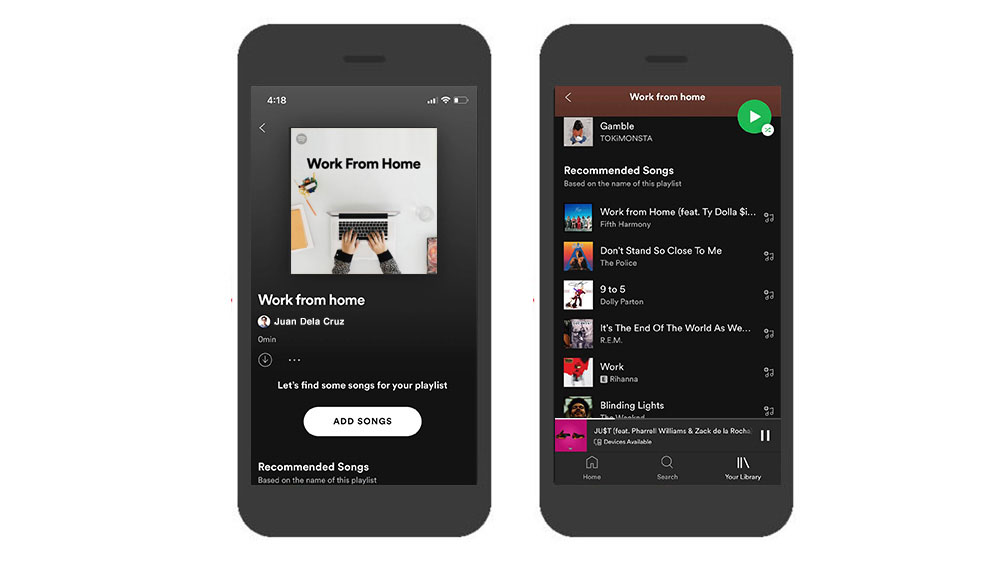
Enter Spotify, which, as you already know, is a music streaming service that you can download for free. Use Spotify to build the background music to a productive day at home for you. Pick out songs you like and add them to a playlist, then, grow that playlist with the help of the Spotify playlist extender, which recommends songs to add based on your playlist's name, the artists in it, and your overall taste profile.
The process of making your own playlist is tons of fun, but if you're not quite ready for that plunge, no worries. Spotify has a bunch of ready-built playlists for just about everything, including your daily tasks. Consider:
A Cleaning Playlist
More time at home means more chores, and without music, these can drive you crazy. Turn your speakers up and blast Cleaning Kit, an official Spotify playlist designed for all the scrubbing, sweeping, dusting, and washing you need to get done. It's a pretty eclectic set with everything from Fleetwood Mac to Kanye West to Billie Eilish, but somehow, everything fits just right, and gets you grooving as you tidy up.
A Cooking Playlist
In Feel Good Dinner, everything from the opening hi-hats of "Untitled" by Kate Bollinger to the discotheque beats of "Up All Night" by Beck is perfect for enjoying food. Whether you're eating alone or with family, turn this one up right before you start preparing to cook. Then just leave it on till after dinner, and even after drinks. (Unless your city is still under a liquor ban, of course.)
A Workout Playlist
You've probably had a workout playlist for about as long as you've been working out, so you don't need us to sell its benefits to you. But allow us to point you in the direction of a favorite workout playlist by Spotify: Locked In, which features a robust mix of hip-hop anthems. This playlist was designed for basketball in particular, but it works for any workout.
A Deep Focus Playlist
And now, for a real productivity playlist: Workday Lounge is the one you put on for weekday mornings, after you've clocked in for a full day of work-from-home. It's smooth, mellow, and most importantly, there are no lyrics. You can just as easily vibe to this if you're a student, and you need to get some reading done.
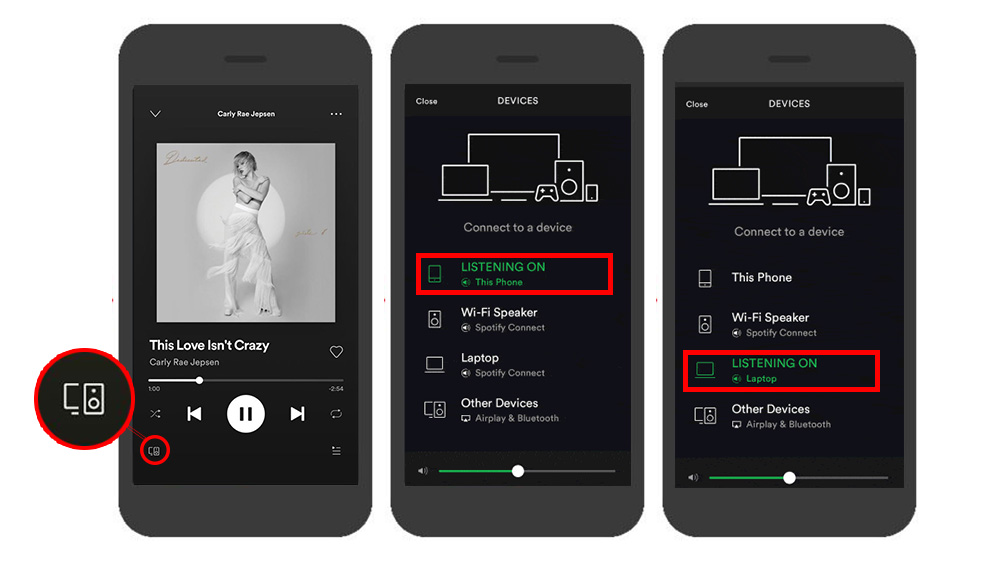
Another cool thing about Spotify: You can control the sound on multiple devices using Spotify Connect. If, for example, you have a laptop and a smartphone at home, you can use both to control a single audio-out. Just tap the "Devices Available" icon in the Spotify interface and connect devices in the same WiFi network. This makes it super convenient to play and control music from wherever you are at home.
These definitely aren't the only things you can do when you inject more music into your life with Spotify. Explore its vast collection of music, as well as its fun and informative podcasts. It has everything you need to make life at home that much more exciting.
Download Spotify for free on the App Store, Google Play Store, and on its official website.