
Free Budgeting Templates for Better Financial Planning
Take control of your finances today.

(SPOT.ph) Managing money properly can be challenging, but finding the right tools for it is half the battle. Luckily for us, there’s no shortage when it comes to budgeting templates on the Internet.
Why a template? They offer a ready-to-use framework that can save you the time and effort to create a budget from scratch. This is especially helpful for those who may not be familiar with advanced spreadsheet functions or even design principles to make it visually appealing. No one wants to look at a bare Microsoft Excel sheet with numbers in the red.
In addition, many of these templates are designed by experts or at least individuals who have a good understanding of budgeting processes. Many platforms offer several budgeting templates that are easy to use, customizable, and most importantly, free! More on that below.
Also read: 10 Part-Time Employment Opportunities in the Philippines
Types of budget templates
Before we look into the platforms, it’s important to know which budget template is the right one for you when it comes to function.
Here are five of the most popular budget templates to consider:
Monthly budget template
This is likely the most used template because it matches the typical billing cycle for many expenses and income schedules. It helps track all income and expenses for each month.
Zero-based budget template
Popularized by financial advisors like Dave Ramsey, this template makes sure everything is accounted for either towards spending, saving, or debt repayment. It's ideal for those who want a detailed and disciplined approach to managing every peso that comes in—and goes out.
50/30/20 budget template
You've likely heard of this concept before in budgeting. This template simplifies the process by dividing expenses into three main categories: needs (50% of income), wants (30% of income), and savings or debt repayment (20% income). It’s great for those who want a straightforward guideline on how to manage income.
Envelope system template
Tend to splurge? Go for the envelope system template.
This method involves allocating cash for different spending categories into envelopes. Once an envelope is empty, no more spending is allowed in that category until the next refill. This is ideal for controlling overspending.
Weekly budget template
The weekly budget template is for the freelancer, gig worker, enterpreneur, and anyone else who isn't tied to a stable employment. Here, finances are laid out on a tighter, more immediate time frame. This is best for those with variable income or expenses that change significantly from week to week.
Free budget templates you can use:
So where to find these budget templates?
There's the visuals of Canva, the versatility of Notion, and the functionality of Microsoft Excel and Google Sheets. We take a look at what's unique about each platform below.
Microsoft Excel

Those who are already familiar with Microsoft’s suite of tools might find comfort in Excel.
Microsoft Excel offers the widest array of budget templates that serve different purposes, including personal monthly budgets, household budgets, vacation budgeting, and even specific events like weddings or educational expenses. The templates integrate well with other Microsoft tools, offering features like automatic calculations to compare projected costs with actual costs. This helps users manage finances more effectively by identifying areas where they may be overspending or underspending.
With advanced templates like Money in Excel, users can also import transactions directly into Excel. This feature provides a comprehensive view of financial health without needing to manually enter transaction details.
Here are the best budget templates on Microsoft Excel.
Canva

Canva's budget templates are particularly unique due to its strong visual appeal and ease of customization. These features make Canva's budget templates appealing to creative individuals, marketers, and small business owners who are looking for more than just a standard spreadsheet.
Users can easily modify colors, fonts, and elements to match their personal or brand aesthetic. Its drag-and-drop interface also makes it simple for users with any level of design experience to create professional-looking budget templates. This makes it accessible for everyone from beginners to more experienced users who want to add a personal touch to their financial planning.
Plus, users can also collaborate on a single template in real-time, making it an excellent choice for partners or families who need to work on budgets together.
Here are the best budget templates on Canva.
Notion
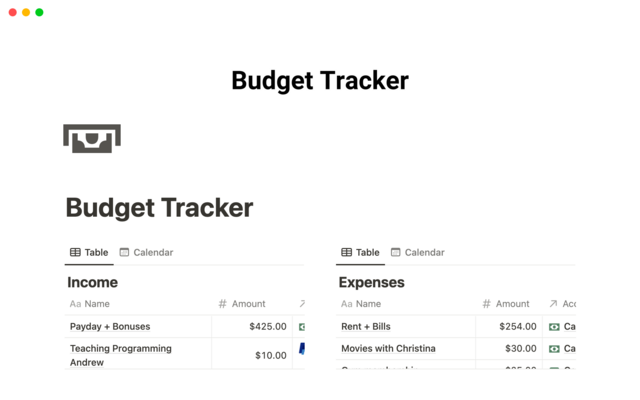
Big on personalization? Notion's budget templates offer a clean, organized interface with little to no limits when it comes to customization.
Notion templates has a very detailed financial planning. Users can track everything from daily transactions to long-term financial goals. This makes it ideal for those who need a broad overview as well as the ability to dive into specifics.
To do this, users can add or modify categories, set specific financial goals, and adjust layouts according to preference. Many templates also incorporate charts and graphs to visually represent financial data, which helps with making informed decisions based on patterns they observe in their spending or saving habits.
Here are the best budget templates on Notion.
Google Sheets
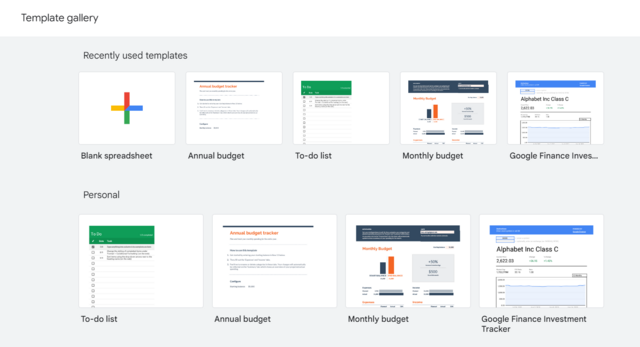
Google Sheets is best known for its built-in formulas that automatically calculate totals, helping to streamline the budgeting process without so much as an error. This feature is great for those who want to save time on calculations and focus more on financial planning.
More importantly, Google Sheets allows multiple users to view and edit the budget template simultaneously—its biggest edge over Microsoft Excel. This is a great feature for partners and families who need to manage finances in real-time.
Since Sheets is part of Google Drive, these templates can be accessed from any device with an internet connection, providing flexibility to manage your budget on the go. Additionally, Google Sheets integrates well with other Google services and third-party apps, enhancing its ease of use across platforms.
Here are the best budget templates on Google Sheets.
Apple Numbers

Don't be fooled—this isn't just for iOS and Macbook users.
Apple Numbers is for everyone who appreciates the integration and aesthetics that are characteristic of Apple products. These templates are part of the Numbers application, which is known for its clean, intuitive interface and ease of use.
Templates can be exported to and imported from other formats like Microsoft Excel and Google Sheets, making it easy to switch between platforms or share files with users who do not use Apple Numbers. It also supports real-time collaboration, so multiple users can work on the budget simultaneously, whether they are using Mac, iPad, iPhone, or even a computer via iCloud.
Also read: 10 Smart Ways to Generate Passive Income in the Philippines