
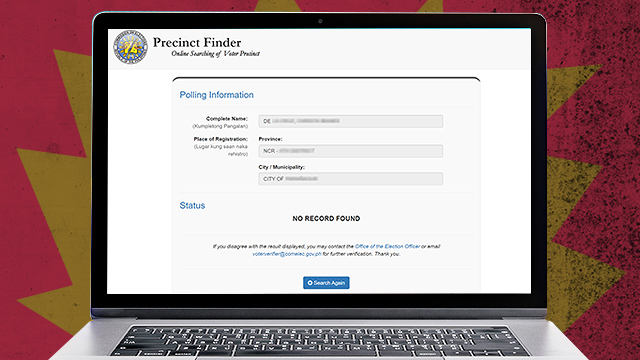
(SPOT.ph) After much waiting, voters finally had the chance to double-check their registration status and polling information when the Commission on Elections Precinct Finder went live on Friday, April 22. People were able to see their Polling Place and Precinct Number just by typing in their full name and place of registration (province and city/municipality). But others weren't as lucky after Precinct Finder showed a "No Record Found" status, even if they were sure that they were active voters. Don't fret (or at least, not yet)! We're pretty sure the Commission on Elections (COMELEC) can get this straightened out—we hope.
Also read: COMELEC's Precinct Finder Is Finally Online
Here's what you need to do if you can't find your records through the COMELEC Precinct Finder:
Send an e-mail.
During the Voter's Registration in 2021, we checked our voter's registration record status through voters_id@comelec.gov.ph. We sent our complete name (middle name included), date of birth, complete address, date of registration, and contact number. After two days, the e-mail address registrationstatus@comelec.gov.ph responded with our status and precinct number just after two days. The downside to this is that they didn't provide our polling place.
You can also send an e-mail to itd@comelec.gov.ph or voterverifier@comelec.gov.ph.
Or better yet, drop a message directly to your city's or municipality's election officer. Just visit the COMELEC website for a complete list of e-mail addresses.

Pick up the phone.
The COMELEC website also shows the phone numbers of your city's or municipality's election officer. Just dial the number.
Visit the Office of the Election Officer in your city or municipality.
With all the people inquiring online about their voter registration record status, COMELEC's inbox may already be swamped. You can proceed directly to the Office of the Election Officer, present an ID, and let them know that you want to check your registration. Someone online said, "When in doubt, check with COMELEC," and we agree.
Play around with the keyboard.
If you don't have a middle name, there's an instruction that says, "indicate underscore or dot." You can choose only one, not both. Pro-tip: We tried the underscore, and that one immediately worked.
People online also recommended putting a period after Jr. or Sr. in case you get an error on the first try.
Others have their second name or middle name misspelled. You may have typed your "Dela Cruz" as "De La Cruz" or vice versa, or you may have missed the tilde line on your "Ñ." It can also happen that you're putting in the correct spelling, but your encoded information has been misspelled so just try all variations.