
What to Do When an Unknown Number Calls or Texts You via WhatsApp
It could be a scam.

(SPOT.ph) Are you getting calls and texts from unknown numbers on the instant messaging app WhatsApp? Be careful before you click links, text, or call back as it could be a scam.
Several users said they have been getting random texts from unknown persons offering job opportunities while some are getting missed calls from local and international numbers. It's not unique to WhatsApp users in the Philippines; app users in India were also warned about a potential new scam.
Some of the messages supposedly come from recruiters who offer part-time and full-time jobs with salaries as high as P20,000 per day.
Also read:
How to Protect Your Data From Scammers, Spammers
Got a Job Invite from Globe? It Could Be a Scam
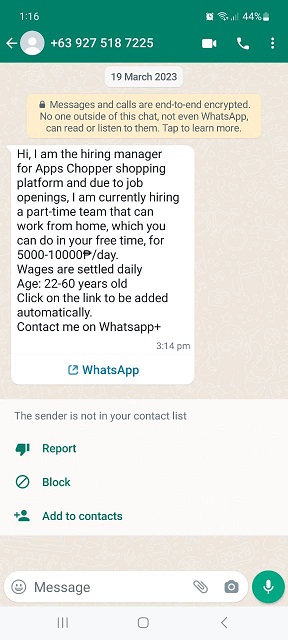
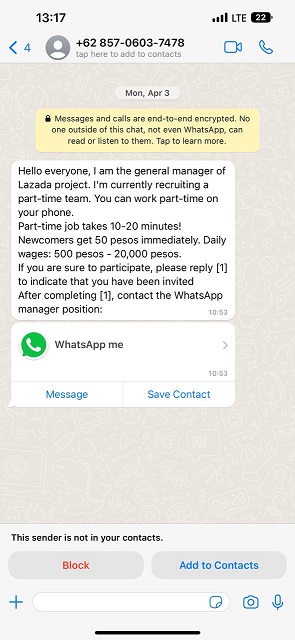
Is this WhatsApp message a scam? Watch out for red flags
WhatsApp warned that other users who may or may not be one of your contacts can still send you messages or call you.
"Just like regular SMS or phone calls, it's possible for other WhatsApp users who have your phone number to contact you, and we want to help you identify and address these types of messages."
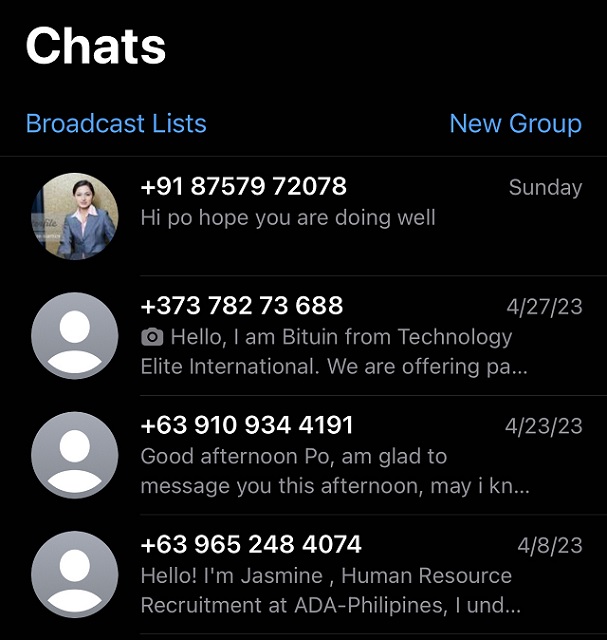
These are just some of the signs the call or message you received via WhatsApp is suspicious:
- It has grammatical errors
- It has links asking you to tap it or to activate new features using the app
- It asks you to share sensitive information like bank details, birth date, or even passwords
- It asks you to forward a message
- It claims that you have to pay to use WhatsApp, which you can use for free
Read more: Don't Click: Scammers Target YouTube Users Via Google Drive Phishing
What to do if you're getting unwanted calls or texts
In case you received any suspicious message or call, do not tap, share, or forward it.
Instead, you can report the message, block the user, and delete the message.
"As a best practice, if you aren’t sure whether something’s true or don’t know who wrote the message you received, we don’t recommend forwarding it," said WhatsApp on its FAQs page.
Here's how to block a contact:
- Open WhatsApp, tap More options > Settings
- Tap Privacy > Blocked contacts
- Tap Add
- Search for or select the contact you want to block
Here's how to block an unknown number:
- Open the WhatsApp chat with the unknown phone number
- Tap Block. You can also report the contact by tapping Report contact > Block
Blocked numbers can no longer call or send you messages. Your status updates and activities will no longer be visible to blocked numbers.
Here's how to report a contact:
- Open the chat with the contact you want to report.
- Tap More options > More > Report.
- Check the box if you would like to also block the user and delete messages in the chat.
- Tap Report.
You can also report an account by long-pressing a single message.
- Long press an individual contact name, then release to open the menu.
- Scroll to the bottom of the menu. Tap Block {contact name}.
What to do if an unknown person calls you
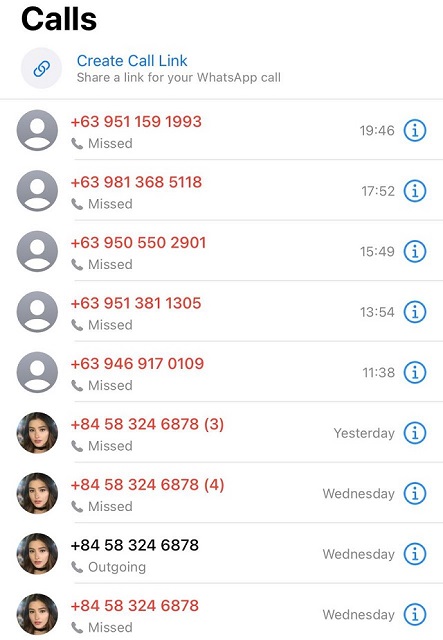
As a general rule, don't answer unknown callers unless you're expecting one, according to service providers Globe and AT&T. If you missed a call, just wait for the person to call back or to text you regarding their concern.
The two telecoms warned against the one-ring scam or "wangiri"—a scam that originated in Japan meaning one-ring-and-cut—where fraudsters dial and drop calls to get the subscribers to call them back. Victims who call back end up being charged a fee.
"Every time you call, you will be charged high international rates or other connection fees. The bad guy gets all or part of those fees," said AT&T.
If you return a missed call, check if there's a + sign before the area code as this meant an international call is being placed, AT&T said. When this happens, drop the call because "the longer you stay on the line, the more you are being charged for the call."
"As tempting as it may be to satisfy your curiosity and call back, remember that fraudsters set out to take advantage of a false sense of urgency, which phone calls tend to trigger," Globe said.