
Here’s How You Can Get 10% Off on 60 Grab Car Rides
Get your money's worth in a few rides.

(SPOT.ph) In a city where every peso counts, Filipinos love a good promo. Here's one for you: a ride voucher package for frequent Grab users within and beyond Metro Manila.
Each RideSaver package will contain 60 vouchers, each at 10% off. Regular users can get it for P99, while GrabUnlimited subscribers can get it at a lower price for P39. The vouchers can be used for GrabCar 4-seater, 6-seater, GrabCar Saver, and GrabShare bookings.
No minimum spend is required, but there is a maximum discount of P50 for every ride (boo). Regardless, if the average cost of your commute is P350, then it will only take around three rides with applied voucher to get your money’s worth.
The vouchers will be valid for 60 days or until the 60 rides are used up—whichever comes first. This subscription is best for those who use Grab on a regular basis.

Grab RideSaver is not just available in Metro Manila, but also in Cavite, Rizal, Laguna, Bulacan, Pampanga, Tarlac, Legazpi, Cebu, Bacolod, and Iloilo.
Also read: Here's How You Can Shop in Physical Stores Using GrabPay
How to get the RideSaver promo on Grab car rides
Open the Grab app. On the home page, click on “All” then “Offers.”
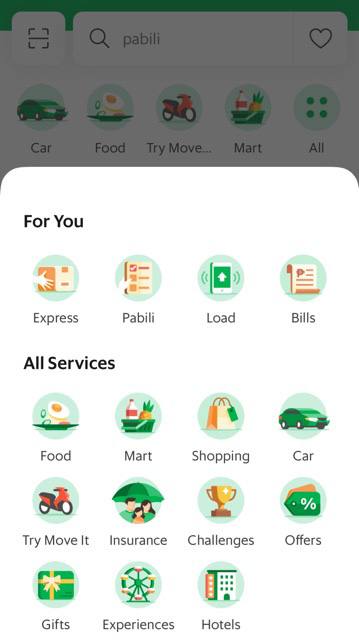
Once inside offers, click “Subscriptions.” There you’ll find Grab RidesSaver.
Can’t find it? You might have to update your Grab to the latest version for it to show up.

Do note that only one package can be bought at a time. RideSaver vouchers can’t be used with other Grab promotions as well.
RideSaver will also automatically renew as long as your payment method is still active, so make sure to plot a reminder before next month’s date in your calendar if you’re planning to cancel the subscription.
Where to find Grab vouchers
Once subscribed, the RideSaver vouchers should pop up in the “My Rewards” page on the Grab home page.
Just use the voucher as you normally would by clicking on “Promo” and “Use Now” for every GrabCar booking where applicable.
Also read: GrabPet Is Finally Back And Larger Breeds Are Now Allowed Inside the Car