Deadline in July: How to Check If You Have Grab Refunds
And how to claim your rebate, if ever.

(SPOT.ph) Grab Philippines remains under the close scrutiny of the Philippine Competition Commission (PCC) due to its violation of pricing commitments in 2019.
Following a cumulative P63.7 million fine, Grab Philippines has been issuing PCC-approved rebates since then—the latest rollout of which was the remaining P6.6 million worth of refunds released over the weekend. Concerned passengers should have received a text message, email, or in-app notification from Grab that they’re eligible for the rebate.
Grab users are urged to claim the PCC-approved rebate vouchers now as they are set to expire on July 18, 2023. You will have to activate your GrabPay wallet to claim the refund, however.
Missed the memo? It's worth checking if you're part of the three million passengers who are qualified for a Grab refund as unclaimed amounts will be remitted to the Philippine National Treasury.
Also read: The SPOT.ph Guide to Using GrabPay
How to claim PCC-approved Grab refund
The Grab rebate is as follows for these three periods in 2019:
- February 10 to May 10: Php1 every P1,200
- May 11 to August 10: Php1 every P450
- August 11 to October: Php1 every P488
“There are some who will get below a peso while some will get over P100 depending on how much and the number of trips,” Grab Philippines President Brian Cu said in November 2019.
You can check if you’re eligible for the refund in the GrabRewards catalogue of the app. Here's how.
Go to the Account Section. Under the “For more value,” section, click Rewards.
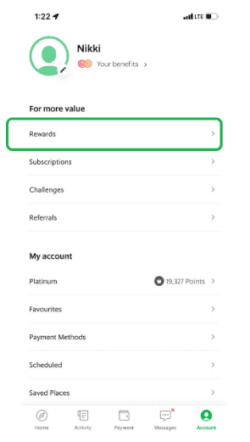
Open My Rewards on the top right corner.
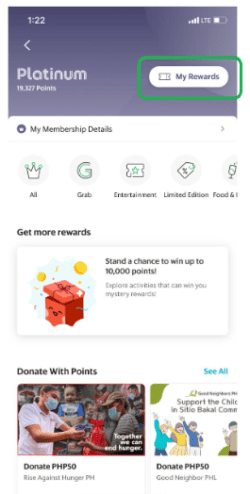
Active Rewards should show up. Look for the PCC Approved Rebates voucher if available. If there’s none listed, it means you are not eligible for the refund.
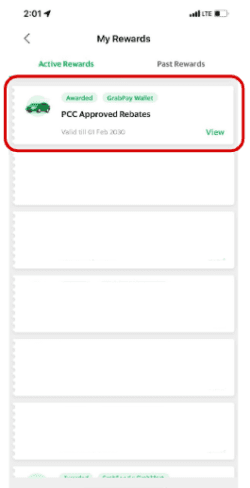
Claim the vouchers on or before July 18 by clicking on the “Redeem My GrabPay Bonus” button. The refunded amount should be added to your GrabPay wallet balance.

Many eligible passengers have not claimed the rebate since they are no longer users of the app or do not have GrabPay wallet. To ensure higher take-up of the refund, the PCC has instructed Grab to exhaust other platforms to provide customers the pending reimbursement.
Also read: You Can Soon Use GCash to Pay for Grab Transactions In-App