
In the past months, text spammers and scammers have devised new ways to trick people into giving away personal details and sensitive information so they can steal your money from your banks. In the latest spiel by the scammers, your name is already included in the text message enticing you to click on a link.
Also read:
Why Are Users' Names Included in Spam Texts?
We Finally Know Who's Behind Those Spam Texts
In November 2021, Esquire PH investigated what happens if you keep clicking on the links within the spam texts. We found that all the spam texts are elaborate phishing schemes designed to prey on people desperate for cash. The perpetrators are also likely based offshore.
Now we've figured out one way to keep those pesky texts from flooding in, to Android phones, that is. With our apologies to our Apple friends, we lay down the method as tried and tested by us for you.
Also read:
Here's How You Can Outsmart a Phone Scammer
Use These Savage Replies the Next Time You Get a Pesky Scam Text
Scammers, You Can't Touch This.
Here's how you can block spam messages from entering your phone:
Since receiving a flood of scam texts in 2021, we installed the Google Messages app and set it as our default messaging app, and have stopped receiving spam texts ever since. If you have an Android phone, you can get the same protection for free by following these steps:
- Download and install the Google Messages app from the Play Store.
- Set Google Messages as your default messaging app.
- Open the app and go to the settings found in the upper-right menu.
- Enable spam protection.
Google has developed the most advanced and competent spam protection among messaging apps. Based on experience, Google Messages effectively blocked 100% of all incoming scam texts in the past 10 months since we installed it.
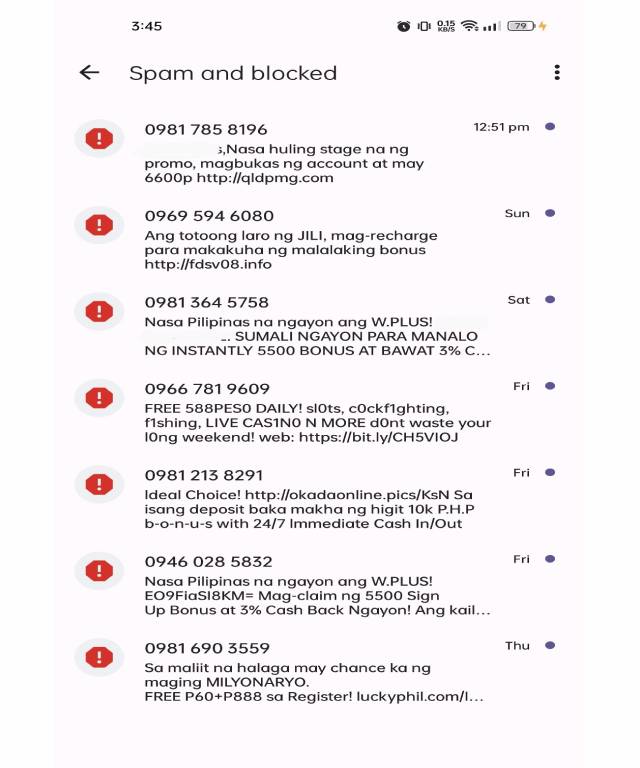
If a spam text is sent to your phone, Google filters it and alerts you with a notification but will not show you the content of the message. Instead, you can view the messages by checking your spam and blocked messages folder accessible in the drop-down menu.
So far, no critical or authentic messages have been filtered or blocked by Google Messages.
You can download the Google Messages app in the Google Play Store.