
So, Looks Like You Can’t Delete Threads Without Deleting Your Instagram; What Now?
Here's what the Instagram CEO has to say about this concern.
(SPOT.ph) Threads has been all over the Internet as Twitter’s rival app, reaching 30 million users within 24 hours of its official launch. This doesn’t even include the 27 countries in the European Union yet, who are putting the new app's roll out on pause over data privacy concerns.
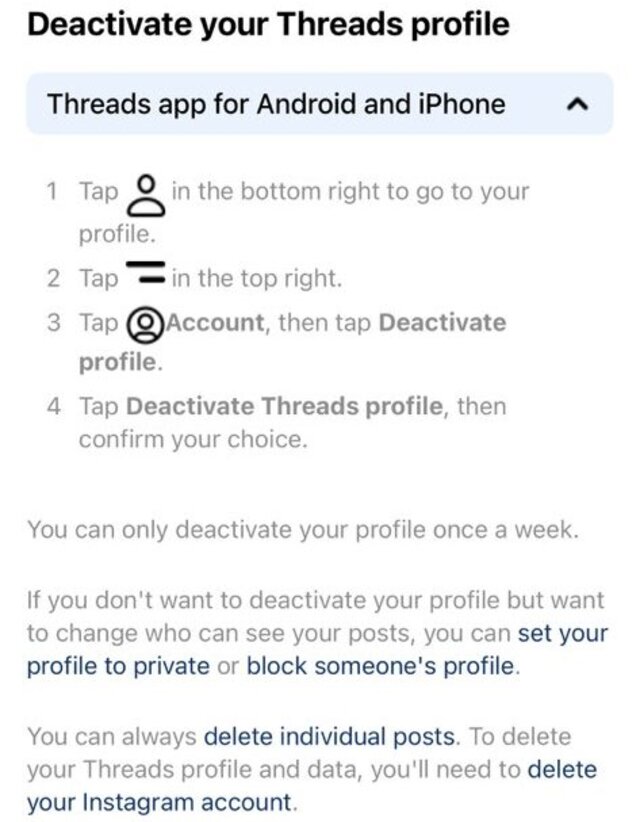
For some users, the excitement they felt using Threads disappeared almost as quickly as it came. They want out…only to discover that they won’t be able to delete their Threads account without deleting their Instagram account that was used to log in with it.
“Your Threads profile is part of your Instagram account, and may be deleted at any time by deleting your Instagram account,” it said on Threads' Supplemental Privacy Policy. You might think of it as Threads holding our Instagram accounts hostage.
Why is this the case? Threads is powered by Instagram, so both platforms are highly interconnected. For example, you can import the list of people you follow on Instagram to Threads or cross-post Thread posts on Instagram as a story.
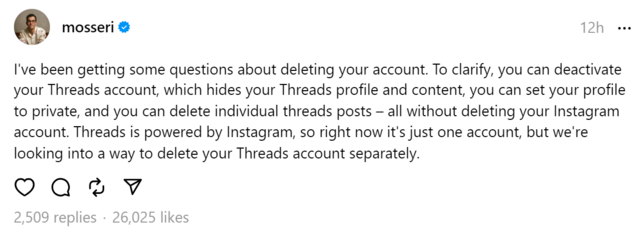
The calls have been heard, as the Threads team is “looking into a way to delete your Threads profile separately” as mentioned on its Help Center. Here's what Instagram CEO Adam Mosseri said on the new platform:
"To clarify, you can deactivate your Threads account, which hides your Threads profile and content, you can set your profile to private, and you can delete individual threads posts – all without deleting your Instagram account. Threads is powered by Instagram, so right now it's just one account, but we're looking into a way to delete your Threads account separately."
Also read: New Social Media Alert: How Does Meta’s Threads Compare to Twitter?
How to deactivate or delete Threads
- Click More in the bottom left, then click Settings
- Click Accounts Center, then click Personal details
- Click Account ownership and control, then click Deactivation or deletion
- Click Deactivate account or Delete account, then click Continue
Deactivating vs. deleting: What is the difference?
The Supplemental Privacy Policy for the new app states that deactivation will only wipe your Threads profile and content.
If you deactivate your account:
- You can reactivate whenever you want
- People can't see your posts or search for your profile
If you delete your account:
- You can't regain access once it's deleted
- Meta delays deletion a few days after it's requested. The deletion request is cancelled if you log back into your Threads account during this time.
- Log records may remain in Meta’s database but are disassociated from personal identifiers.
Also read: Twitter Users, Promoting Your Facebook or Instagram Account Could Get You in Trouble