
How Apple Intelligence in the iOS 18 Update Can Help You
It's set to change the way we use our devices.
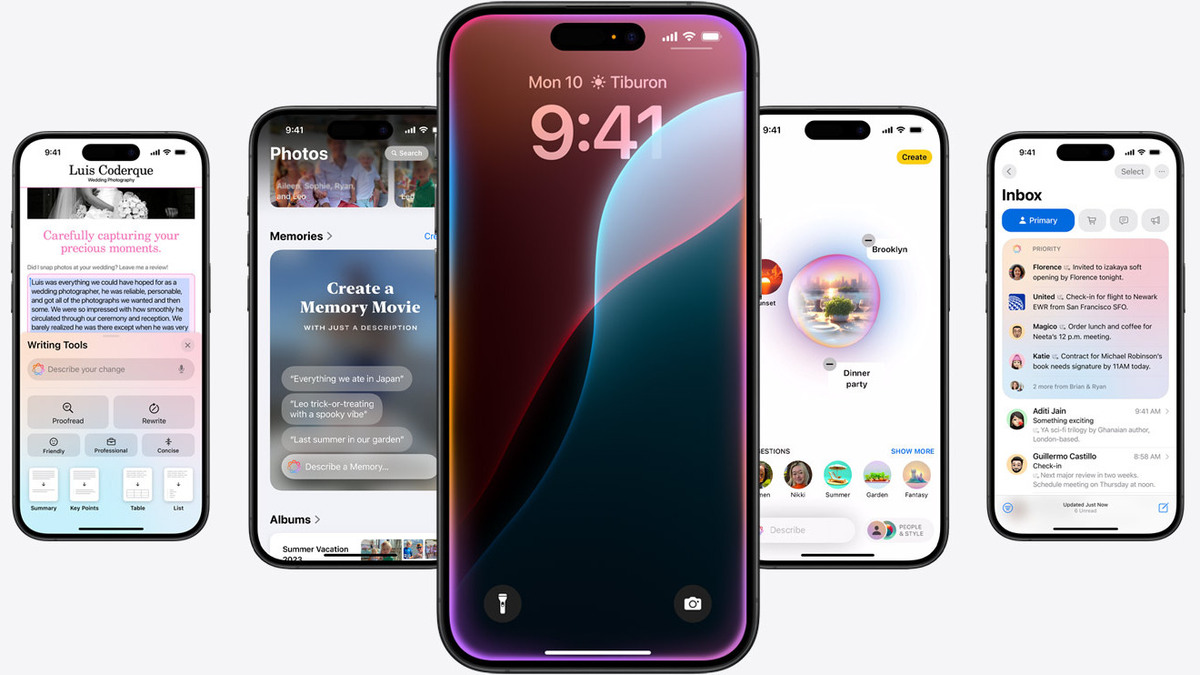
(SPOT.ph) Apple has recently previewed the new iOS 18 features with a promise to make the iPhone “more personal, capable, and intelligent than ever.” It’s clear everyone is buzzing with anticipation, but what exactly we can expect from generative artificial intelligence (AI) being looped into Apple’s operating system?
The new customization options are great and everything, but it's really Apple Intelligence that shines in the new iOS 18 system update. Apple Intelligence is Apple's latest foray into making our devices smarter and our lives easier.
So, what's in it for you? Tech jargon aside, here’s everything Apple users can look forward to in the new iOS 18 system update.
Also read: PSA: You Can Buy Apple Products With a Student Discount
What to expect from Apple Intelligence in Apple’s iOS 18 system update
Take note that Apple Intelligence is only compatible for iPhone 15 Pro, iPhone 15 Pro Max, iPad Air, iPad Pro, MacBook Air, MacBook Pro, iMac, Mac mini, Mac Studio, and Mac Pro. Expect to get your hands on the beta version by this fall, which is around September.
Improved focus modes
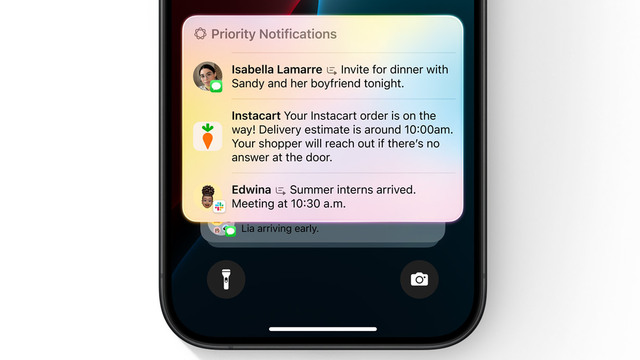
Tired of feeling overwhelmed with constant notifications?
The new Reduce Interruptions Focus Mode filters out the noise, only showing you the most important alerts. Priority notifications from key contacts or time-sensitive reminders are placed at the top. This is particularly beneficial for those who need to concentrate on work or personal projects without frequent interruptions.
Smart Mail Features
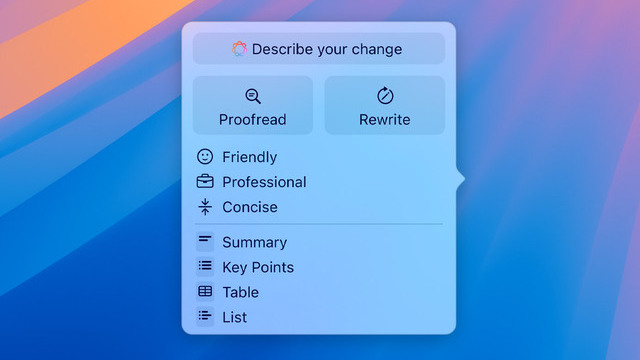
You can let go of that Grammarly or ChatGPT subscription soon with Apple Intelligence’s proofreader for any issues with grammar, word choice, and sentence structure.
Apple Intelligence can rewrite your emails to suit any tone, whether you need to sound more professional or make it more concise. This ensures that you can adapt your communication style to suit various contexts easily.
Additionally, the AI can summarize long emails, helping users quickly grasp the main points without reading the entire message. Priority management features will also move important emails to the top of the inbox.
More personal context
One of the standout features of Apple Intelligence is the significant Siri upgrade to make it a more useful assistant. Siri will now have a better understanding of your personal context, such as your contacts, calendar appointments, and frequent locations.
This means you can ask Siri to do things like "Remind me to call Mom when I get home" and it will use your location data to set the reminder accordingly. It can also cross-reference information from messages and emails for questions like “Where is my Thursday dinner with Josh again?”
Smarter voice and text control
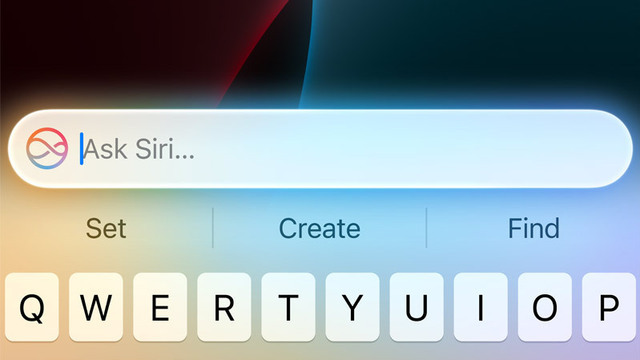
Siri will now have a better understanding of user commands. You can expect it to provide spoken answers instead of just showing web links, summarize lengthy documents, and interact with your apps more effectively. You will also be able to string multiple commands together like “Crop this photo to a square and send it to Bianca.”
If you’re the type to stumble over your words, Siri will still be able to understand what you mean with its richer language understanding capabilities. It’ll remember what you just talked about too, so you can make further instructions that correspond to your original query.
Did we mention you can now type to command Siri, too? No need to talk out loud for everyone to hear to engage with Siri. It'll work the same.
New transcription tool
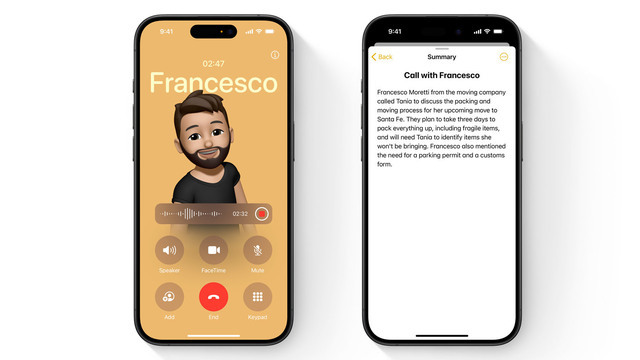
Voice memos and phone calls can also be transcribed and summarized automatically in the Notes app, making it easy to keep track of important conversations. You read that right—it can transcribe phone calls in real time so you don't miss out on any important information!
This feature is especially useful for those who need to review or reference these conversations later, such as formal interviews, academic settings, or business meetings. However, do note that this is only available in US English, so it won't be able to catch Filipino words for now.
Advanced Notes app

The Notes app is enhanced with AI capabilities that cater to both text and visual content. It can solve mathematical equations on the fly, making it a handy tool for students and professionals who need quick calculations. Just type an equal sign to get the answer in a second.
For those who think visually, Image Wand in the Notes app can transform rough sketches into polished AI-generated art, allowing for quick visualization of ideas. This feature is particularly useful for those who need to create diagrams or illustrations but have no artistic skills to go with it.
Expansive Spotlight searches
Looking for something specific? Apple's Spotlight shortcut are a god-send for people who aren't sure where to start looking—and now it's gotten even better.
The new update will combine everything it can find with deeper searches within apps and documents, so you can request for things like “Show me all the notes and drawings I’ve made about home improvements” or “Show me all my chicken recipes.”
Enhanced photo management
No need to manually sift through hundreds of photos to look for that one image. Users can now search for specific images using plain language like “dog on the sofa” and Apple Intelligence will look for it for you!
Don’t know how to use photoshop? You can instruct Apple Intelligence to edit photos like "make this image pop" or "remove that stranger from the background.” This makes photo editing more accessible, especially for those who are not familiar with traditional photo editing software. Features like cropping, resizing, rotating, and applying filters are also supported.
Also read: Apple Music Sing Lets You Have a Karaoke Party With Your iPhone