The SPOT.ph Guide to TVs
From the types to specs you need to know.

(SPOT.ph) Before the advent of the Internet being available in every household, the television, commonly known as the TV, was the centerpiece of entertainment at home. From just being a status symbol and an appliance used as a pastime, the television has evolved into something that has become part of our daily lives, even in the age of computers and the Internet. In this article, we talk about television’s history, the different types, and tips for buying brand-new and secondhand units.
Also read: The SPOT.ph Guide to Coffee
History of the Television
When searching for who invented the TV, many names will appear. The likes of John Logie Baird of England, Charles Francis Jenkins of the United States, and Philo Taylor Farnsworth also of the U.S.
Academic papers will point to Farnsworth as the first one to have successfully demonstrated an electronic television in September 1927. The 21-year-old inventor thought of a system that could capture non-still images that can be coded into radio waves and beamed back to a picture on a screen. This particular invention scans images with a beam of electrons, which is considered the technology behind modern-day TV. You may ask, what was the first image beamed on a TV unit? A line. Straight and simple. Further experiments would have Farnsworth’s camera aiming at a dollar sign, a somewhat cheeky response to his investors asking, "When are we going to see some dollars in this thing, Farnsworth?"
The commercialization of the TV started when Radio Corporation of America invested some U.S. $50 million for the development of the appliance. The company made history in 1939 when the speech of then-U.S. President Franklin D. Roosevelt at the opening of the New York World’s Fair was aired live on TV. Roosevelt effectively became the first president of any nation to appear on television. To further develop the TV, RCA acquired the licenses to use Farnsworth’s television patents. The first commercially sold Radio Corporation of America (RCA) television sets had 12.7 cm x 25.4 cm picture tubes. RCA, as well as its competitor in the radio business, CBS (Columbia Broadcasting System), produced programs for airing in these television units.
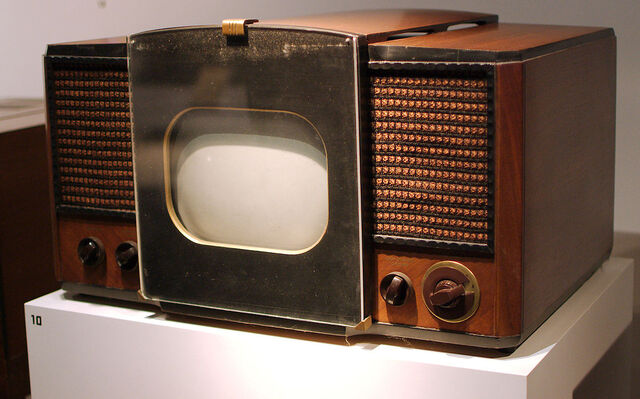
With more and more American households owning a television set after World War II, the commercial TV broadcasting industry started in the U.S. around 1947. Television networks started to air regular news programs, as well as produce entertainment shows.
In the Philippines, American engineer James Lindenberg is regarded as the “Father of Philippine Television.” Lindenberg established and assembled the transmitters for the Bolinao Electronics Corporation (BEC) on June 1946. The company, named after the hometown of Lindenberg’s wife (Bolinao, Pangasinan) applied for a Philippine Congressional license to put up a television station in 1949 (the license was granted a year after). However, due to the scarcity of raw materials, coupled with strict import control in the country at that time, Lindenberg decided to venture into radio broadcasting instead.
According to historical accounts, Judge Antonio Quirino, the brother of former President Elpidio Quirino, also applied for a television station license from the Philippine Congress, however, his request was denied citing that he might use it as a propaganda vehicle for the second term run of his brother in 1953. The enterprising Quirino then decided to buy 70% of BEC, effectively giving him indirect control of the television franchise that the company held at that time. Judge Quirino changed the name of BEC to Alto Broadcasting System (ABS), while Lindenberg remained co-owner and the station’s General Manager.
On October 23, 1953, ABS (now known as ABS-CBN), placed the Philippines in history books as the first Southeast Asian country, and the second country in Asia, to put up a commercial TV broadcast when they launched DZAQ-TV Channel 3. It was said that some of ABS’ people underwent training in the United States under RCA.
Two years after, companies like Radiowealth (originally a radio manufacturer), Carlsound, and Rehco started to put up television-set assembly plants and started selling TV units in the country.
In 1956, businessmen Eugenio and Fernando Lopez established Chronicle Broadcasting Network (CBN), which later acquired ABS from Judge Quirino. The two companies were merged under the name Bolinao Electronics Corporation (BEC).
Also read: The SPOT.ph Guide to Speakers
Difference Between TVs and Monitors
Though they may look the same from the outside, television sets and monitors are different. A monitor is computer hardware used for display purposes whereas televisions are electronic devices that we use to view video content.
However, at this age and time, it is common for us to purposely use a modern TV set as a computer monitor and vice-versa. For family use, it is wise to purchase a wide-screen smart television, which can also double as a computer monitor if needed. But if you are the kind of person who is not a fan of TV shows and late-night news, I would suggest that you get a PC monitor which can also act as a television set using set-top-boxes, or you can simply watch TV shows via live stream.
With technology becoming more affordable, it is sometimes hard to choose between the need to buy a new television set or just settling with a computer monitor.
Types & Variants
We can determine the different types of television sets based on the display technology that they have.
Disks & CRTs
The earliest TV models used rotating disks to create and reproduce images beamed to them by broadcast networks. These models usually had a low resolution and small screen sizes.
The development of Cathode-Ray Tubes (CRT) paved the way for more commercially available TV sets. CRTs have vacuum tubes attached to at least one electron gun or emitter. A fluorescent screen is then used to view the images transmitted to the television unit. To produce an image, the entire front area of the tube is scanned repetitively and systematically using a raster (fixed pattern). Using a video signal as a reference, an image is produced by controlling the intensity of the beams emitted by the electron gun/s, normally in red, green, and blue colors (RGB).
Digital Light Processing
Originally developed in 1987, Digital Light Processing (DLP) is a video projector technology that utilizes a digital micromirror device. Some DLP manufacturers decided to add a TV tuner for devices intended for home use projection TV units which became popular at the turn of the century (the widescreen displays of yesteryears). The same technology is used for digital cinema projection.
Plasma Display Panel
Television sets based on CRT technology have this limitation: the bigger the screen, the heavier the unit is (because you will be needing bigger tubes). Television displays with more than 30 inches in diameter are where Plasma Display Panels (PDP) are useful. This type of TV set uses small cells or chambers that contain electrically charged ionized gases (thus this technology is called “plasma”).
Liquid Crystal Display
The more commonly available type of TV sets out in the market now are those with Liquid Crystal Displays or popularly known as LCD TVs. Units under this type are much thinner and lighter compared to CRTs of similar display sizes. Television units that use LCD technology come in two types: the ones using cold cathode fluorescent lamps (LCD TVs) and the ones using Light Emitting Diodes as backlight (LED TVs).
It was reported that in 2007 the worldwide sales of LCD television units surpassed that of CRT-based television sets.
Organic Light-Emitting Diode (OLED)
It is now common to see Organic Light-Emitting Diode (OLED) TV sets being sold in the country. An OLED is an LED that has an emissive electroluminescent layer (a film of an organic compound) that emits light in response to an electric current. This layer is placed between two electrodes, one being transparent. The same technology is used for computer monitors, smartphones, and even on portable gaming consoles. Displays using OLED technology works even without a backlight, which is why they can display deep black levels. Displays under this type are also thinner and lighter than LCD-based units.
Things to Look Out For (Specs)
When buying a brand-new television set, here are the specs that you need to consider:
Screen Size
Determining the right TV screen size for the home can be a tough task. You need to consider how many people will watch at the same time, as well as where the TV unit will be placed. The popular screen sizes for homes these days are somewhere between 55 and 65 inches.
Screen Resolution
Screen resolution refers to the number of pixels (horizontally and vertically) needed to produce a picture on a display. The more pixels there are means the sharper picture and the finer detail—this is what higher resolution means.
Some TV units can only have up to HD 720p (1280 x 720 pixels) resolution, while some can offer up to HD 1080p (1920 x 1080 pixels) resolution. Modern TV sets now support up to Ultra HD 4K (3840 x 2160 pixels) resolution. Having a 4K TV means that small objects on the screen will have more details and texts will appear sharper —more life-like.
Refresh Rate
Aside from resolution, prominently displayed in the specifications of TV sets these days is the Refresh Rate (presented in Hertz/Hz values). This refers to how many times a picture is refreshed on the screen each second.
At present, 60 Hz is deemed as the standard refresh rate—meaning, a picture is refreshed 60 times per second on the TV screen. If you have an HD-capable TV, rapidly moving objects may appear blurry or jittery under a 60 Hz refresh rate, that’s why manufacturers doubled this value up to 120 Hz (or even up to 240 Hz). Newer HD TV units also offer High-Frame Rate (HFR) support for movies and live broadcast content.
If you have gamers in the family, make sure to buy a TV unit that can support up to 120 Hz as gaming consoles like the PS5 and Xbox S/X will produce awesome graphics under this setting.
Operating System, Connection Ports, & Accessories
More and more people prefer Smart TVs over conventional (non-smart) ones. Smart TV units are capable of connecting to the Internet and running a myriad of applications that we often see on computers and smartphones. Some Smart TVs run on popular operating systems such as Android, WebOS, Tizen, tvOS, and Java (just like the old Nokia smartphones). I suggest getting a Smart TV that runs on an operating system that supports the apps ecosystem that you use (i.e. if you’re an Android user, be sure that the Smart TV will let you install and use Android apps and the like).
When it comes to connection ports, modern TV units usually come with at least one HDMI port, an RCA connector, and a USB port (for media display or storage). More often than not, brands will only package the new TV unit with either a set of RCA or USB cables; HDMI cables are usually an add-on thing.
For accessories, of course, the remote control remains to be included standard out of the box.
Popular Brands, Usual Prices & Where to Buy
When shopping for a new TV set, the go-to places are still the physical appliance stores. Nothing beats having the feel of the actual size of your next entertainment appliance. But with online promos here and there, it is also common to shop online at our favorite online shopping sites.
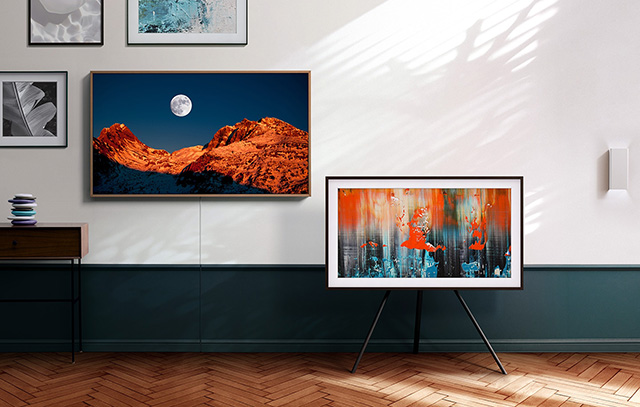
Among the trusted brands when we talk about Smart TVs in the Philippines are LG, Samsung, Sony, and TCL (Panasonic), but be sure to shell out at least PHP15,000 to get one of their newer devices. Newer brands such as Ace, Coocaa (owned by Skyworth), Devant, and Xiaomi are also good options if you are tight on the budget as they have product offerings between P5,000 to P20,000.
Tips When Buying Secondhand TVs
If you are on a tight budget or are just shopping for a spare TV set (say to be placed in another area in your house), here are some of the things that you need to check when buying a secondhand TV set:
- Check first why the seller is selling the unit. Is the seller selling the unit because it broke down or is there any defect in the picture screen and the like? if the seller’s answer is “Yes,” I suggest that you pass and look for another one.
- Check on the item first before sealing the deal. Play with the unit’s brightness, contrast, and color settings. Also, check if there are screen burn marks (usually caused by leaving a fixed image on the screen for a long period of time).
- Check on the TV ports. Do not buy a unit that has loose connections as this will only bring headaches soon enough.
- Are the accessories, or at least the remote control still available? Universal remote units that are available online may not be compatible with older TV units, and sometimes buying a remote control for them may turn out to be more expensive than the secondhand unit itself.
- How about the sounds? Ensure that the unit’s speakers are still in good shape and are still capable of producing good audio quality.
- Lastly, check if the price is reasonable. You may be surprised to know that the price of a brand new CRT-based TV set may be cheaper than what others are selling secondhand online.

