
Here's How You Can Still Get Tickets to Taylor Swift's The Eras Tour in Japan
The second round of ticket lottery opens on July 28.

(SPOT.ph) So you’ve exhausted your options for The Eras Tour, from general on-sale to Klook packages to Facebook groups, just for a chance to see Taylor Swift in our nearest neighboring country of Singapore. With her only Southeast Asian stop already sold out, why not give Japan a try?
Tokyo has four shows from February 7 to 10 at the Tokyo Dome. You might have initially supressed hopes to see her in Japan after hearing how locals have to go through a complex lottery system to secure tickets. However, it’s a lot simpler than people make it out to be—and it's about to open for another batch of ticket buyers.
The second round of sign-ups for the ticket lottery opens Friday, July 28 at 10:00 a.m. and closes Thursday, August 3 at 11:59 p.m. There’s no need to rush in this process because everyone who signs up within this period will have an equal chance at winning the lottery; that is, at random.
No queue numbers, no stress, no competition—just sign up on your own time within the week.
Also read: No Lottery Here: Japan Opens General Sale for The Eras Tour on August 22
How to buy tickets to The Eras Tour in Japan
You can start signing up for the ticket lottery application starting Friday, July 28 at 10 a.m. Here's a comprehensive guide on how to navigate Japan's ticketing infrastructure.
Before going into it, make sure you're fully set on watching The Eras Tour when trying this route since ticket changes and cancellations are prohibited. Your credit card will automatically be charged for the tickets if you've been selected as a lottery winner, too.
Also read: Here’s How Much Taylor Swift’s Japan The Eras Tour Tickets Cost in Pesos
Download the AnyPASS application
You will need to download the AnyPASS app to receive your tickets. It is available on both iOS and Android devices, which should be easy enough to navigate since there’s an English version of the app.
Input your mobile number. Note: Instead of receiving a verification code, you will have to be the one to send a verification text coming from the mobile number you have provided. More on this in the next step.
Click “Agree to the Terms of Use and Send an SMS.” Immediately, a text message with a bunch of numbers will pop up on the screen, which you will have to send to the provided number. You will need to have enough load to send this verification text.
Once verified, create an account with an email and password. The email used should be the same as the one being used to sign up for the ticket lottery in the Lawson Ticket website later.
Authenticate your email address, then proceed with filling out the information in your profile. Receiving a QR code is the last step to this whole process.
Lottery winners will receive the electronic tickets in the AnyPASS app in the coming months.
Take note that only the mobile phone number registered in AnyPASS at the time of application can receive tickets, as ticket information is linked to the mobile phone number. That said, don’t change or cancel your mobile phone number until the day of the performance.
Also read: LF: The Eras Tour Tickets? Here Are Ticketmaster and Klook's Policies on Ticket Reselling
Sign up for the lottery on Lawson Ticket
Go to the Lawson Ticket website to sign up for the lottery. Scroll a little further to find the “English Ticketing Page.” Click on this to be redirected to the lottery application.
You will only get to choose your preferred date (February 7 to 10), section (SS, S, A, and U-20), and number of tickets (1 to 4). Everything else is left up to lottery.
Remember: You can only purchase a maximum of four tickets per account. Do note that buying multiple tickets will not guarantee that the seats will be next to each other. It is a lottery, after all.
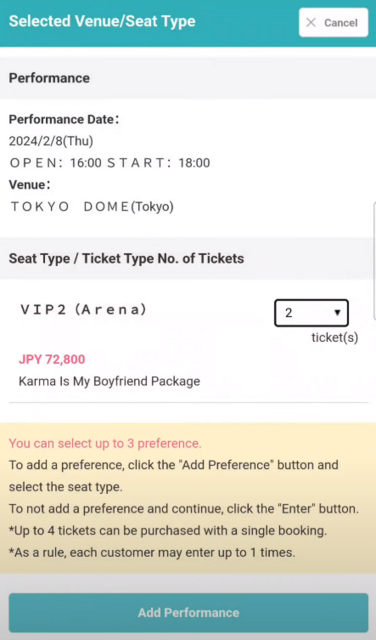
The “Add Preference” button allows you to pick and rank three sections of your preference for the chosen performance date. The lottery system will take your preferences into account—so it says.
The next page will ask you to input the following information to confirm the lottery application: full name, email address, telephone number, and mobile number. Make sure the mobile number matches what you provided in your AnyPass application. You will also be required to create a password for future logins in the Lawson Ticket website.
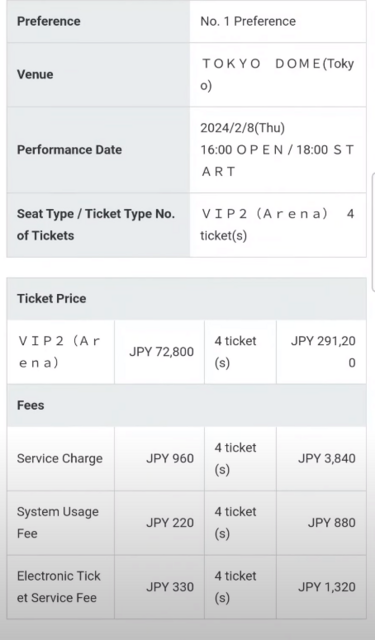
Finally, it’s time to pay to secure your slot in the lottery. Credit card is the only payment option for international buyers, which will automatically be charged once you are selected as winner.
PSA: P1 might be charged to your credit card right away as Lawson Ticket's way of confirming if the inputted payment option works.
Wait for the email confirmation
You should get an email confirmation with the subject “Notice of lottery entry completion.” After that is the waiting game.
Everyone who signed up for the lottery should receive another email a few days after the lottery ends revealing if they have won or lost. By then, winners will also be notified of the successful payment from the inputted credit card.
Good luck, Swifties!