GCash Flashback: Here's How You Can Check Yours + More
Get a glimpse of how you spent that hard-earned money.

(SPOT.ph) In case you missed it, GCash launched its GCash Flashback feature. If you're familiar with Spotify Wrapped and other similar annual overviews like those that we also saw in shopping apps, GCash Flashback is essentially the same stuff. GCash Flashback serves as a sort of digital ledger that can help you see your financial transactions this year. Aside from helping you see where all your money went, you may use it for budgeting, financial planning, and keeping track of expenses and income while you're at it.
This article will walk you through the steps so you can see GCash Flashback in your app. It will also discuss some of the financial areas covered in this app feature.
Read More:
The SPOT.ph Guide to Cashless Payments
You Can Now Use GCash in the U.S., Canada, Japan, Australia, and the UK
Here's How to Get Your Own GCash Visa Card
GCash Flashback: How to Check
To access the GCash Flashback feature, follow these simple steps:
- Open the GCash app on your mobile device.
- Click on the "Profile" button located at the lower-right side of the screen.
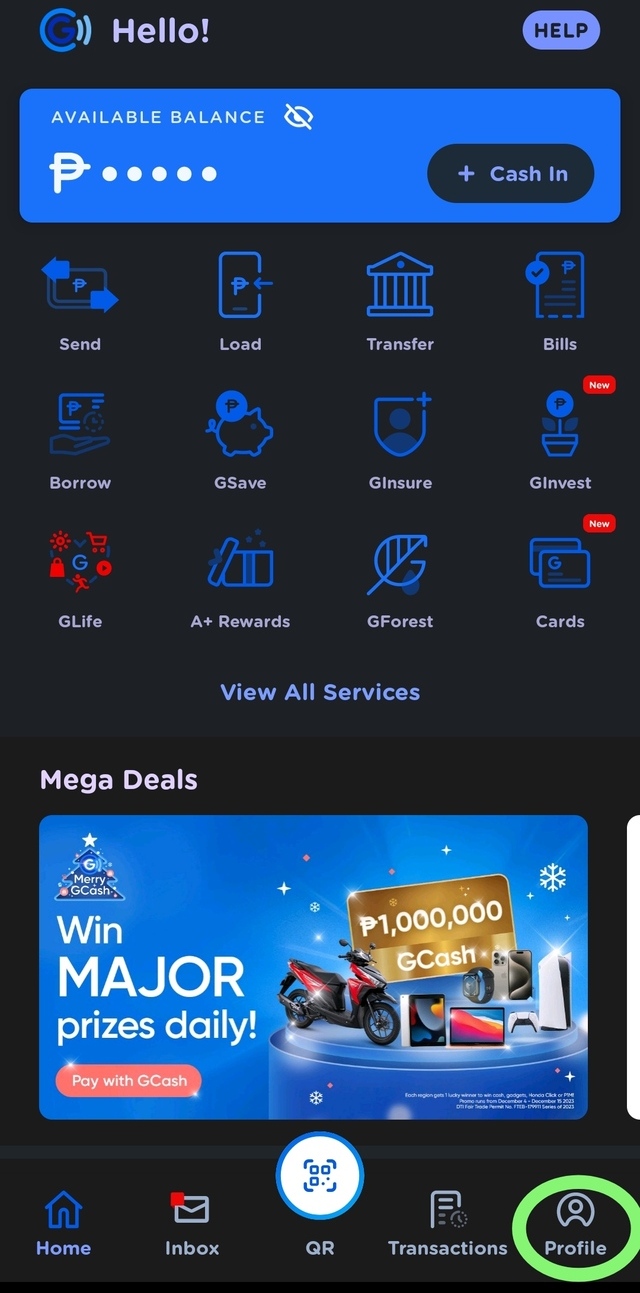
- The next screen will show your app profile. Click on the "GCash Flashback" button below your name and number on the right side.

- Click "Let's go."

- Enjoy a quick view of your financial journey this year.
GCash Flashback: Other Info
Using the GCash Flashback feature is straightforward as it is, so you don't have to worry about where to look for it in case you want to take your financial obligations more seriously or just too curious to see how you did this year. Here are other things you may be interested to know about the app feature:
Key Benefits of Using GCash Flashback
Here are just some of the most important GCash Flashback benefits you can get out of using the feature:
- Visibility. Get a clear view of your past transactions.
- Organization. Transactions are categorized for easy reference.
- Convenience. Access your financial history anytime, anywhere.
Searching for Specific Transactions
You can search for specific transactions by:
- Date range
- Transaction type
- Amount
Understanding the Parsing Error
Recently, some users have encountered a parsing error when using the Google Search tool to access GCash Flashback. This error can prevent users from viewing their transaction history correctly.
Resolving Common Issues with GCash Flashback
When facing issues like the parsing error, there are a few steps you can take to resolve them:
- Try updating the app, if you haven't yet.
- Clear the app cache.
- Update the GCash app to the latest version.
- Contact GCash support for further assistance.
Security Measures in GCash Flashback
GCash takes the security of your financial data seriously. The Flashback feature is equipped with various security measures to protect your information.
- Ensuring your data is safe
- All data is encrypted
- Multi-factor authentication is required for access
- Regular security updates are implemented
Budgeting with GCash Flashback
GCash Flashback can be an invaluable tool for budgeting. Reviewing your transaction history can help you identify spending patterns and make informed decisions about your finances.
Here are some of the tips you need to know if you're using GCash a lot of manage your finances:
- Categorize your expenses.
- Set spending limits based on your transaction history.
- Review your Flashback regularly to stay on track.
The Future of GCash Flashback
GCash continues to update and improve the Flashback feature. Future updates may include more detailed categorization, predictive budgeting, and personalized financial insights.
Staying Updated with GCash Features
To stay informed about the latest updates to GCash Flashback, you can:
- Follow GCash on social media.
- Subscribe to GCash newsletters.
- Regularly check the What's New section in the app.
If you're wondering if GCash Flashback is available to all users, yes, it's available to all GCash users so you don't have to worry if you need an extra pass or a VIP account of sorts.
If you want to look back to your Gcash Flashback stats and want to export the data related to this, it may not be possible at this time. As an alternative, you may just screencap the info and do your compilation in the meantime.
GCash Flashback is a powerful feature that provides users with a comprehensive view of their financial transactions. By understanding and utilizing this feature effectively, you can enhance your financial management and planning. Remember to keep your app updated and reach out to GCash support if you encounter any issues.