
The SPOT.ph Guide to Using the eTravel System for International Flights
It replaces the One Health Pass and paper Arrival and Departure cards.

(SPOT.ph) International travel often requires a lot of documents just to get through immigration gates, including filling out arrival and departure cards. The pandemic pushed most sectors to go digital, minimizing the use of pen and paper but still depending on typing in many details. The Philippines' eTravel System, which is fully implemented for all inbound and outbound travelers in the Philippines starting on April 15, is one of them.
The Bureau of Immigration will discontinue the use of paper-based arrival and departure cards starting May 1.
What is eTravel?
eTravel was first used on December 2, 2022 as a replacement for the Department of Health and Bureau of Quarantine's One Health Pass. It holds an electronic Health Declaration Card, which has become essential during the pandemic; as well as an electronic passenger registration.
eTravel users get a QR code, which can be downloaded after registration or received through e-mail. You can save the QR code on your smartphone or print it out, but a screenshot is always more convenient. This should be shown to respective scanners at the airport or before boarding your flight.
Also read:
Do You Need to Bring Your Yearbook or Diploma to the Airport?
What Happens When a Passenger Goes Through Immigration at the Airport?
How to Register Through the eTravel System
Step 1: eTravel website
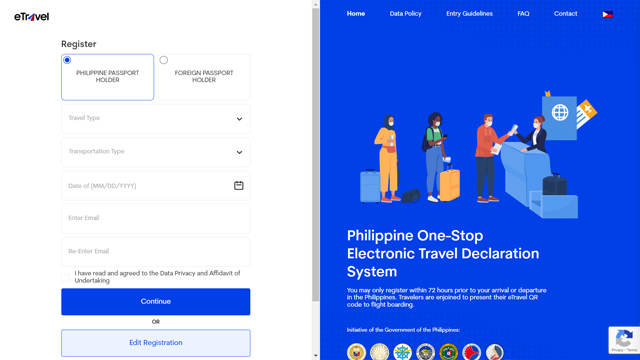
Go to the etravel.gov.ph website on your Internet browser, whether on your smartphone, tablet, laptop, or personal computer.
Choose whether you're a Philippine passport holder or a foreign passport holder. You're also supposed to choose your travel type: arrival (entering the Philippines) or departure (leaving the Philippines); indicate your transportation type (air or sea); key in your travel date through the calendar; and enter (and re-enter) your e-mail address.
As long as you have not been processed, verified, and tagged as arrived by border health authorities, you're also allowed to edit your information on eTravel through this step.
Step 2: Personal Profile
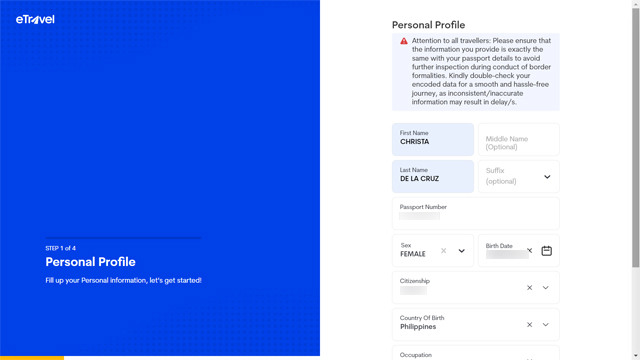
After filling out the preliminary information on the home page, proceed to step one of the registration: Personal Profile. Enter your first name and last name, as well as your middle name and suffix if necessary. You should also key in your passport number, select your sex at birth, choose your birth date, and select your citizenship and country of birth from the drop-down menu. This step also asks for occupation and mobile number.
Step 3: Address Information
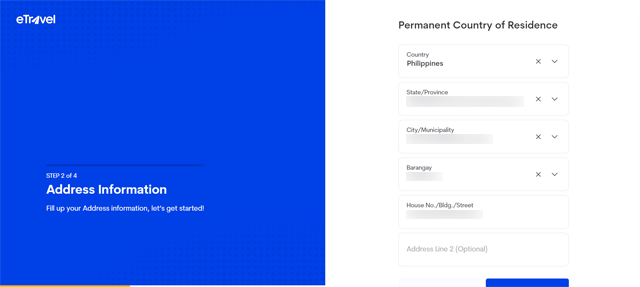
From the drop-down menus, eTravel registrants are asked to put in their permanent country of residence, province, city or municipality, barangay, and street with house number.
Step 4: Travel Details
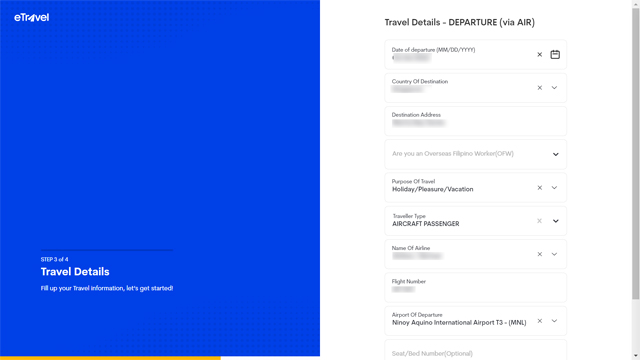
Whether you're arriving or departing, passengers should indicate the date of departure or arrival, country of destination, destination address, purpose of travel, traveler type (aircraft passenger or crew), name of the airline and flight number, and airport of departure. You should also indicate whether you're an Overseas Filipino Worker or not. If this page looks familiar, that's because this is the digital version of the paper departure card you fill out at the airport.
Step 5: Review your information
After filling out all the pages, registrants are asked to review their information. The eTravel website also has this important reminder: "Please ensure that the information you provide is exactly the same with your passport details to avoid further inspection during conduct of border formalities. Kindly double-check your encoded data for a smooth and hassle-free journey, as inconsistent/inaccurate information may result in delay/s."
Step 6: Save a copy of your QR code
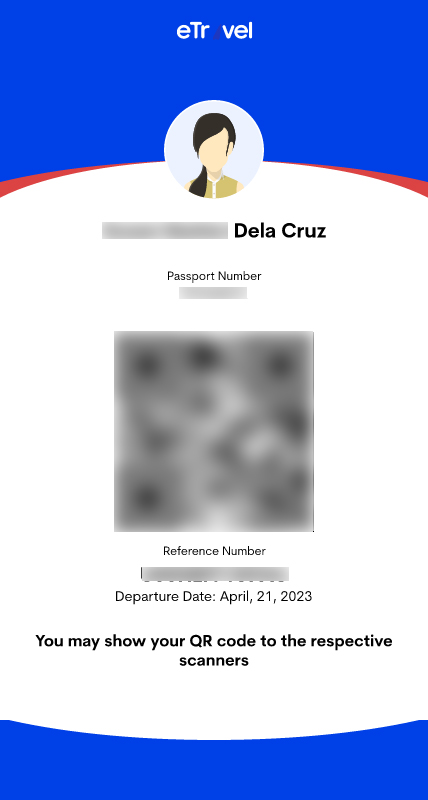
You may download a copy of your QR code through the eTravel portal or get it through the e-mail sent to you. This will be shown at the scanners at the airport or before you board your flight.
Other Things You Should Know About eTravel
Do you need to pay for eTravel registration?
eTravel registration is free of charge. The government reminds travelers that the eTravel platform does not collect or require any form of online payment. Registrations should beware of fake, fraudulent, or scam websites and entities that require payment upon registration.
Do you need to download a mobile app to use eTravel?
eTravel is a web-based online platform with a mobile-friendly interface through any Internet browser. It can be accessed through a smartphone, tablet, laptop, or personal computer with a stable Internet connection. You don't need to download anything from Google Play or Apple Store.
When should you register?
Travelers are required to register within three days (or 72 hours) prior to arrival and departure in the Philippines. This is to make sure that your declared health condition is recent.
What is the privacy policy of eTravel?
According to eTravel, the information provided by registrants may only be accessed by the Bureau of Immigration, Bureau of Quarantine, Bureau of Customs, and Department of Tourism as Data Processors, as well as the Department of Information and Communications Technology as the Data Controller. This is in accordance with the standards prescribed by the National Privacy Commission pursuant to Republic Act No. 10173 re: "Data Privacy Act."
Can you still edit your travel information after registration?
As long as you have not been processed, verified, and tagged as arrived by border health authorities, you can still edit your information through the "Edit Registration" button on the home page of the eTravel portal.
Also read:
10 Essentials for Your Next Long-Haul Flight
10 Zero-Waste Travel Essentials for the Eco-Conscious