
So What Can You Do With The Latest Government App, eGOV PH?
Here's a roadtest.

(SPOT.ph) UPDATED: National government has introduced yet another app—a one-stop online system where you can access multiple services easier, and ideally, combat corruption in the process with just a click.
Introducing eGOVP PH, or e-Government Philippines, which aims to simplify government transactions as long as you have a mobile phone and Internet connection. This is not to be confused with other government agency apps introduced less than a year since President Ferdinand "Bongbong" Marcos Jr. took over, like Official Gazette Mobile App where you can find the latest executive orders and holiday announcements.
At a time when every service—transportation, groceries, news, even hair removal—has an app, is it worth downloading yet another government app on your low-storage smartphone? We at SPOT.ph tried the app to see what it can offer.
Also read: Need Your National ID Now? This Digital-to-Print Version is Your Alternative
How to register for eGOV PH
First, download the app. It's available via Google Play and App Store.
Once downloaded, you can start the registration.
- It will ask for your mobile number and to accept the Terms and Conditions and Privacy Policy.
- OTP will be sent to your phone.
- You will be asked to create an MPIN.
Note that you have to verify your account before you can use most of its features.
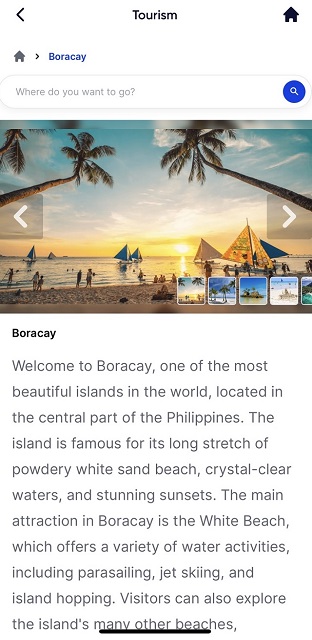
Unverified accounts can only take you to "Tourism", where each tourist destination were introduced and you can get directions going to that spot. Ideally you can choose among these: beachfront, mountain, island, and camping. So far, only beachfront has selections. You can also open the "Health Services" feature. So to maximize what the app can do for you, verify your account.
Also read: How Many Philippine Provinces Have You Been To? Track Your Travel Level Using This App
For "Identity Verification", you can scan your PhilSys QR for faster registration, or you can manually input your name, birthdate, and email address. You wil aso be asked to identify whether you're male or female.
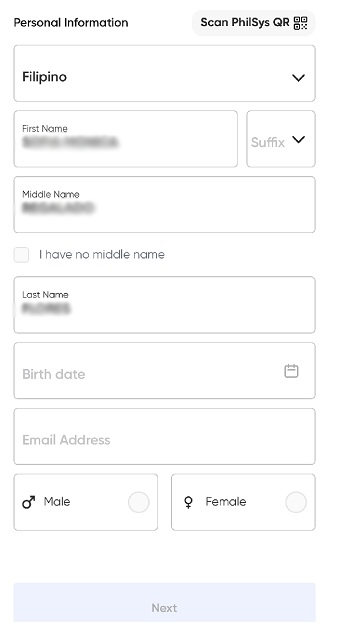
You will also be asked to imput your complete address, and be ready to take a live selfie. It's not just for verification; it's going to be your ID picture for the app. FYI in case you need time to comb your hair or put a bit of powder on your face.
Once done, wait for the email verification. Here's a reminder to check your Spam folder in case it got lost there.
Read more:
National ID Mobile App Is in the Works While You Wait for the Physical Card
Motorists, a Driver's License (Digital Version) Is Heading Your Way
The services in eGOV PH app
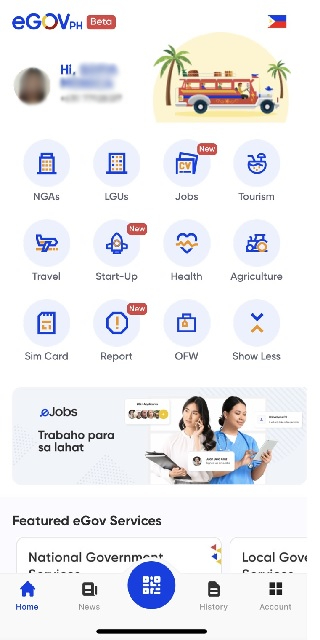
Once you're all verified, you can access all the app's features.
Want a copy of your Digital Philippine ID? You can now download its image when you click the QR code at the bottom of the app. Click the "Show National ID details" so you can also see the personal information you've registered there.
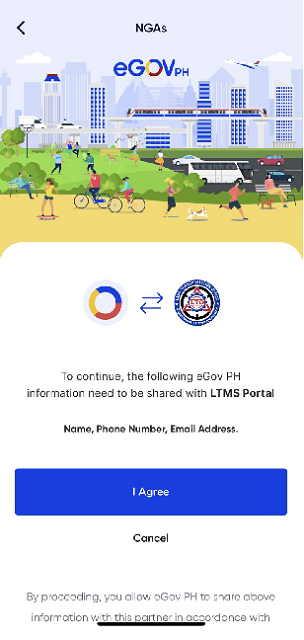
Under "NGAs", you can search for national government services. It will link you to government agencies like the Department of Foreign Affairs. Take note though that the search bar can only look for the agencies listed, not the specific services it offers so if you want to look for passport services, type in DFA.
Services may not be readily available, like like the e-Passport and eApostille. In the case of other services like LTMS Online Portal and NBI Clearance, the app will instead link you to the websites so you won't have to look it up via Google.
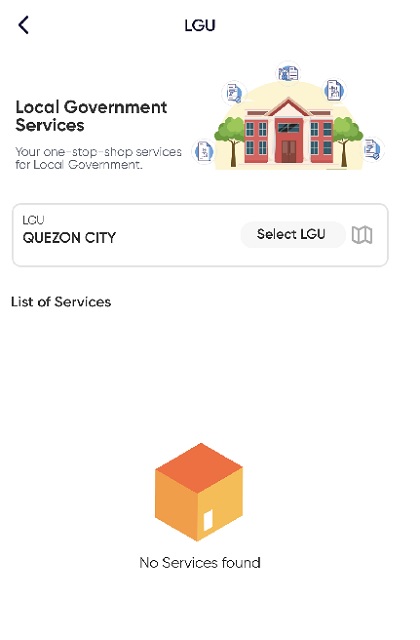
Under "LGU" or local government units, ideally it would show the services available in the city where you're in. So far, services in Quezon City where this writer is registered remains unavailable at least on the app.
"Jobs" will link you to eJobs where you can upload your resume. "Startup" links tech startups in the Philippines. These will require separate registration, though.
For travelers, the eTravel is also available via this app. In case you don't know, it's a requirement for all inbound and outbound travelers in the Philippines.
Those who have yet to register their SIMs can do so under the SIM Card feature, where you can visit Globe, Smart, DITO, or GOMO's websites with one click.
Want to report a scamming incident, crime, red tape, women and/or children abuse, overpricing, fire, or accidents? You may do so via "Report", which links you to the People's Feedback Mechanism.
While these have their separate icons in the app, "OFW" and "Agriculture" tab said it is "coming soon."
Editor's note: This article is updated on September 29 to reflect the latest features of the app, including the Digital Philippine ID.